
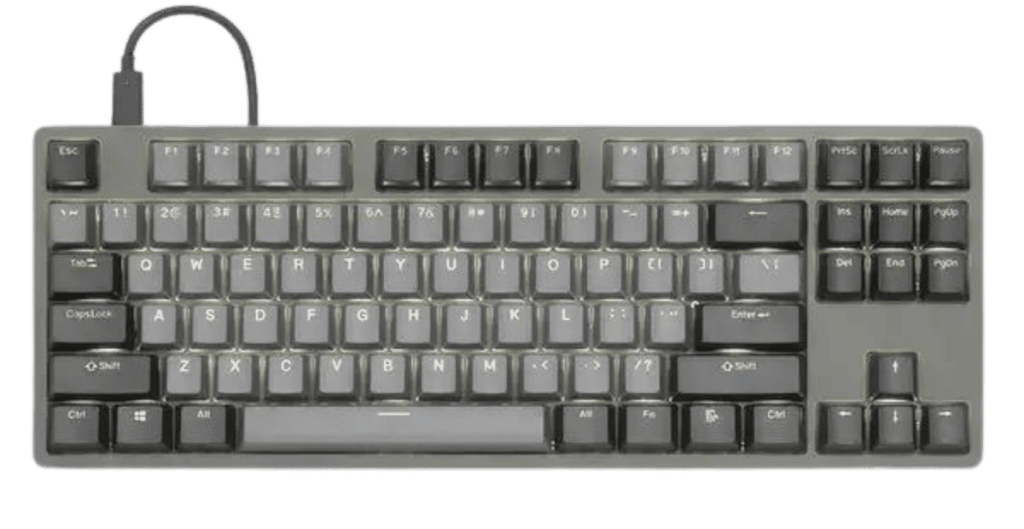
If you’ve spent any time around mechanical keyboards, chances are you’ve heard about the Drop CTRL High-Profile. It’s one of those keyboards people don’t just use—they talk about it, customize it, and proudly show it off on their desk setups.
I’ve spent a good amount of time typing on the Drop CTRL High-Profile, and this article is based on hands-on experience, not spec sheets alone. If you’re wondering whether this premium mechanical keyboard is actually worth the price, let’s break it down in a real, practical way.
Table of Contents
What Is the Drop CTRL High-Profile?
The Drop CTRL High-Profile is a tenkeyless (TKL) mechanical keyboard designed for enthusiasts who care about build quality, customization, and typing feel. Unlike low-profile or plastic keyboards, this one is built like a tank—solid aluminum body, hot-swappable switches, and per-key RGB lighting.
The “high-profile” part means the aluminum case fully surrounds the switches, giving it a clean, premium look and extra weight on your desk.
Build Quality: Solid and Premium
Heavy, But in a Good Way
The first thing you notice when you lift the Drop CTRL is the weight. This keyboard doesn’t move around when you type. At all.
The aluminum case feels cold and sturdy, almost like a high-end laptop chassis.
From daily office work to long writing sessions, that stability makes a real difference. There’s no flex, no creaking—just a firm, confident feel under your hands.
Clean Design That Fits Any Setup
The design is minimal but bold. No flashy logos, no unnecessary curves. Whether your desk setup is all-black, RGB-heavy, or minimalist, the Drop CTRL fits right in.
Typing Experience: Where It Really Shines
Switch Options Matter
One of the best things about the Drop CTRL High-Profile is that it’s hot-swappable. You can change switches without soldering, which is perfect if you like experimenting.
Common switch options include:
- Cherry MX Brown – balanced, good for typing and light gaming
- Cherry MX Blue – clicky and loud, satisfying but not office-friendly
- Halo Clear or Halo True – heavier, more deliberate typing feel
I personally preferred tactile switches for long writing sessions. They reduce typing errors and feel more controlled than linear switches.
Sound Profile: Deep and Satisfying
Because of the aluminum case and high-profile design, keystrokes sound deeper and more refined. It’s not silent, but it’s not cheap or hollow either.
In real life, this means:
- Pleasant typing sounds at home
- Might be too loud for shared offices (depending on switches)
Keycaps and Layout

Stock Keycaps Are Decent
The stock keycaps are solid, but not exceptional. They do the job, but if you’re picky, you’ll probably want to upgrade.
Luckily, the standard layout makes it easy to swap in aftermarket keycaps. I switched to thicker PBT keycaps, and the typing feel improved noticeably.
Tenkeyless Layout = More Desk Space
If you don’t use the number pad much, the TKL layout is a win. You get:
- More mouse movement space
- Better ergonomics
- A cleaner desk look
For writers, programmers, and gamers, this layout just makes sense.
RGB Lighting and Customization
Bright, Per-Key RGB

The RGB on the Drop CTRL is bright and smooth. It’s not just for looks—you can customize it to highlight keys you use often or keep it subtle.
VIA and QMK Support
This is where the keyboard really becomes powerful. With QMK and VIA support, you can:
- Remap keys
- Create macros
- Adjust lighting behavior
It takes a little learning, but once set up, it feels tailored exactly to your workflow.
Daily Use: The Real Test
I used the Drop CTRL High-Profile for:
- Writing long articles
- Editing content
- Casual gaming
- Daily browsing
After hours of use, fatigue was minimal. Pairing it with a wrist rest made it even more comfortable.
One thing to note: this keyboard doesn’t have wireless support. It’s wired only. For me, that wasn’t a deal-breaker, but it might matter if you prefer a cable-free desk.
Pros and Cons
Pros
- Excellent build quality
- Hot-swappable switches
- Deep, satisfying typing sound
- Powerful customization options
- Premium, professional design
Cons
- Expensive compared to mainstream keyboards
- Wired only
- Stock keycaps are just average
Who Should Buy the Drop CTRL High-Profile?
This keyboard is ideal for:
- Mechanical keyboard enthusiasts
- Writers and programmers who type a lot
- Users who love customization
- People who value build quality over portability
If you just want a simple keyboard for casual use, this might be overkill. But if typing is a big part of your daily life, the Drop CTRL High-Profile feels like a long-term investment.
Final Verdict: Is It Worth It?
After using the Drop CTRL High-Profile, it’s clear why it has such a loyal fan base. It’s not just about looks or RGB—it’s about the experience. Every keystroke feels intentional. Every customization option adds value.
Yes, it’s expensive. But for people who care about how their keyboard feels, sounds, and performs day after day, the Drop CTRL High-Profile delivers exactly what it promises.
If you want a mechanical keyboard that feels truly premium and grows with your preferences, this one is hard to beat.
FAQs (The Drop CTRL High-Profile)
1. Is the Drop CTRL High-Profile good for typing?
Yes, it offers a comfortable and satisfying typing experience thanks to its solid aluminum build and customizable mechanical switches.
2. Can I change switches on the Drop CTRL High-Profile?
Yes, it supports hot-swappable switches, allowing you to replace switches easily without soldering.
3. Does the Drop CTRL High-Profile support RGB lighting?
Yes, it features per-key RGB lighting that can be fully customized using VIA or QMK software.
4. Is the Drop CTRL High-Profile wireless?
No, this keyboard is wired only and does not support Bluetooth or wireless connectivity.
5. Who should buy the Drop CTRL High-Profile?
It’s ideal for mechanical keyboard enthusiasts, writers, programmers, and gamers who want premium build quality and customization.