
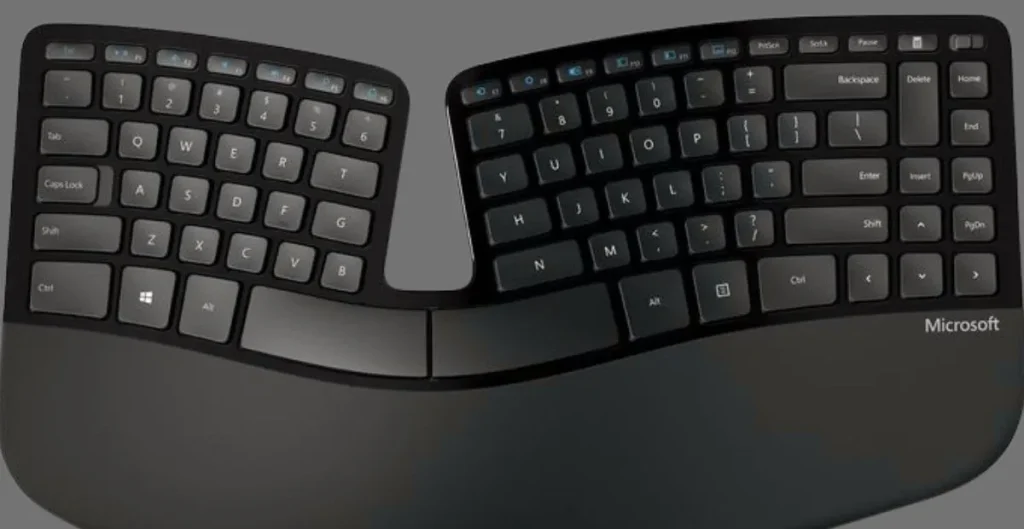
If you type a lot — whether for work, writing, programming, or everyday tasks — comfort matters. Traditional flat keyboards often cause wrist discomfort, finger strain, and shoulder tension after long sessions. That’s where the Microsoft Sculpt Ergonomic Keyboard comes in. In this review, we’ll explore how this unique keyboard feels in real use, where it shines, and where it falls short.
Table of Contents
What Is the Microsoft Sculpt Ergonomic Keyboard?
The Microsoft Sculpt Ergonomic Keyboard is an office-friendly keyboard designed to promote healthier hand and wrist posture. Its defining feature is the curved, split layout, which aims to keep your hands in a more natural position compared to standard straight keyboards.
It’s a wireless keyboard with a separate numeric keypad, so you can place the number pad where you like — or out of the way entirely.
Design & Build Quality — A Modern Look With a Twist
Unlike bulky, old ergonomic keyboards of the past, the Sculpt has a smoother, simpler shape that doesn’t dominate your desk. Compared to older models like the Natural Ergonomic Keyboard 4000, the Sculpt is smaller and more refined.
👉 The separate numeric keypad is a smart design choice because it allows you to keep your mouse closer to your hand — reducing overstretching.
The keyboard doesn’t feel like a premium mechanical board, but its build quality is solid for everyday office use.
Typing Experience — Comfortable but Different
The keys use scissor-style switches, similar to laptop keyboards — they’re quieter and more responsive than older mushy membrane keys, yet not as tactile as mechanical switches.
Most users report a pleasant typing feel, especially once they adapt to the layout. However, some might find the key resistance a bit soft if they’re used to mechanical keyboards.
💡 Learning Curve:
Since the layout is not traditional, you might need a few days to type comfortably at full speed. This is very normal with ergonomic keyboards, as your hands adjust to the new shape and spacing.

Ergonomic Comfort — Designed for Wrist Health
The biggest reason people choose the Sculpt is comfort. Its gentle dome shape and split arrangement help reduce wrist bend and forearm pronation — common contributors to repetitive strain injuries (RSI).
The cushioned palm rest adds a softer landing spot for your wrists, which is a nice bonus during long typing sessions.
👉 Ergonomics here don’t guarantee that wrist pain disappears completely, but they can reduce discomfort significantly compared to flat keyboards.
Wireless Performance & Battery Life
The Sculpt connects via a small USB dongle (not Bluetooth), which generally provides a stable and reliable connection.
Battery life is often very good, since the keyboard runs on standard batteries rather than short-lived rechargeable ones.
Pros & Cons — Quick Summary
✅ Pros
- Excellent ergonomic design that supports natural posture.
- Comfortable and quiet typing experience for office work.
- Separate number pad allows flexible desk layout.
- Easy setup without special software.
❌ Cons
- Not suitable for serious gaming — no macro keys or backlight.
- Takes time to adjust if you’re new to ergonomic keyboards.
- Keycap legends may wear over time.
- Layout and function keys can feel unusual to some users.
Who Is This Keyboard For?
✔ Office workers who type most of the day
✔ Writers and bloggers looking to reduce wrist strain
✔ People already experiencing RSI symptoms
✔ Anyone who wants a more natural typing posture
Not recommended for:
✘ Hardcore gamers
✘ Users who prefer mechanical keyboards
✘ Those who need backlit keys
Tips for Best Use
🟢 Place the numeric keypad where it makes your desk feel balanced.
🟢 Give yourself a few days to adjust — it gets easier.
🟢 Use a keyboard tray for even better posture.
Final Verdict
The Microsoft Sculpt Ergonomic Keyboard is a thoughtful and comfortable keyboard that stands out for its ergonomic design and typing comfort. It won’t replace high-end mechanical boards for gamers or power users, but for daily office work and long typing sessions, it’s a strong choice. Its split layout, comfortable keys, and flexible numeric pad position make it a worthwhile upgrade over traditional keyboards for many users.